
Route planning guide for mobile groomers
Build a route you can actually finish.
Group stops by area, protect drive time, leave honest grooming buffers, and review every change before the van moves.
- Group stops by area
- Protect drive and grooming time
- Approve every route change
The owner stays in control
Preview the route. Check the suggestion. Decide what changes.
OpenDog can help compare stop order and route estimates. Appointment times, customers, pets, services, and staff stay unchanged unless the owner chooses otherwise.

Start with service areas, not empty calendar slots.
A two-hour opening is not useful if filling it sends the van across town and back. Decide which neighborhoods belong together and which days you normally serve them.
- Group nearby ZIP codes, cities, or neighborhoods
- Keep regular clients in repeatable area patterns when possible
- Check a new address before offering a time
- Leave room to say no to a stop that hurts the whole day
Build the day from facts you already know.
Route planning works best when the appointment includes the address, service, dog, expected grooming time, groomer or van, and any detail that changes how long the stop may take.
- Drive time between confirmed addresses
- Service length based on the dog and work requested
- Parking, setup, cleanup, and access time
- Coat, behavior, health, or household details that affect the visit
Use honest grooming buffers.
Buffer time protects the rest of the route. Add more around new clients, difficult coats, anxious dogs, large breeds, multi-pet homes, uncertain parking, and long drive segments.
- Use recent visit history when you have it
- Do not plan every stop around the fastest possible groom
- Protect lunch, cleanup, payment, and client handoff time
- Adjust the buffer when the same type of visit keeps running late
Review stop order before changing the day.
A shorter-looking route is not automatically the best route. Check appointment windows, pet needs, client promises, groomer assignments, and the next two stops before accepting a different order.
- Compare the saved order with the suggested order
- Preview distance and duration before deciding
- Keep confirmed appointment times unchanged unless you choose to edit them
- Send client updates only after the route decision is final
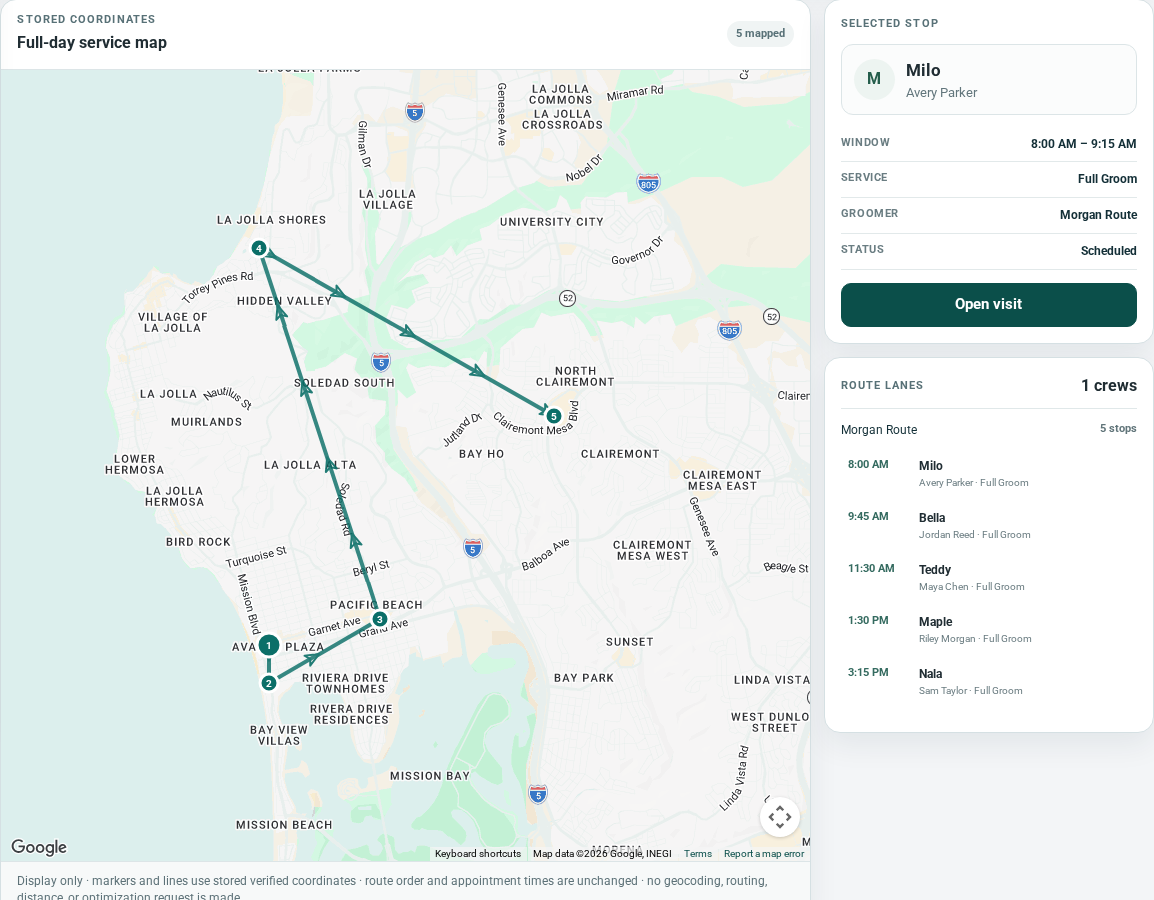
Use the map as a review tool—not a promise.
A map helps you see stop order and area spread, but it cannot know every road closure, driveway, parking problem, vehicle limit, or grooming delay. The driver and business still verify the safe, practical route.
- Check addresses before relying on the route
- Review current road and weather conditions when they matter
- Treat estimates as planning help, not guaranteed arrival times
- Keep the final driving decision with the person running the day
Handle same-day changes without chasing the gap.
When a client cancels, runs late, adds a dog, or changes the address, look at the rest of the route before filling the opening. Protect the confirmed stops before adding new work.
- Check the next two appointments, not only the empty time
- Confirm that a waitlist client fits the area and service window
- Move a poor-fit request to a better route day
- Update arrival expectations after the route is settled
Turn good routes into repeatable patterns.
When a route works, use it to guide rebooking. Keeping regular clients near the same area day can make future scheduling clearer for the groomer and easier to explain to clients.
- Suggest the next visit while the current groom is fresh
- Offer weeks that match the client’s normal service area
- Keep a little capacity for changes and new requests
- Review the pattern when drive time or service length changes
Use a five-minute route check before the first drive.
Open the full day and look for the few problems that can spread into every later stop.
- Every address is complete and inside the intended area
- Drive time and stop order make sense
- Hard or uncertain grooms have enough buffer
- Pet, access, parking, and payment notes are ready
- Cancellations, no-shows, and new requests are resolved
- Any route change has been reviewed and client updates are ready
FAQ
Common questions from grooming businesses.
How often should a mobile groomer review the route?
Review route fit when accepting a request, check the complete day before service, and look again the morning of the route when an address, pet detail, cancellation, or timing has changed.
How much buffer time should I add?
Use your real visit history. Add more time for new clients, difficult coats, anxious or senior dogs, large breeds, multi-pet homes, parking, setup, cleanup, and long or uncertain drives.
Does OpenDog change appointment order automatically?
No. OpenDog can show the saved order, help preview route estimates, and offer a stop-order suggestion. The owner reviews and confirms a change before stop numbers are updated.
Does a Google map guarantee the fastest or safest route?
No. Maps and estimates support planning, but the business and driver still verify addresses, road conditions, vehicle limits, safety, arrival windows, and the practical order for the grooming day.
How should booking requests fit the route?
Collect the address, dog, service, and preferred timing first. Review service area, drive time, grooming length, and the surrounding stops before confirming an appointment.
What should I do after a same-day cancellation?
Check the full route before filling the gap. A waitlist client is useful only when the address, service, pet, and timing fit without damaging the confirmed stops that remain.
Plan the route with the whole appointment in view.
See how OpenDog keeps the address, drive estimate, dog, service, payment context, and route decision together before the van moves.